You can customize the sender of the email that delivers badges by connecting your own SMTP server (available at Pro level).
By default, badge notification emails are sent using Open Badge Factory’s standard email configuration. If you want the emails to appear as sent from your own domain, brand, or email address, you can do so by setting up a custom SMTP connection.
Why customize the email sender?
Connecting your own SMTP server allows you to:
Use your own sender email address (e.g. badges@yourdomain.com)
Display your organization name as the sender
Improve email deliverability and reduce the risk of emails going to spam
Keep all badge-related communication fully aligned with your brand
How it works
When a custom SMTP server is connected:
All badge notification emails are sent through your SMTP configuration
The “From” name and email address reflect your settings
Open Badge Factory no longer uses its default sender for those emails
How to set it up
Go to your admin tools settings > pro features in Open Badge Factory
Open the SMTP server section.
Enter your SMTP server details:
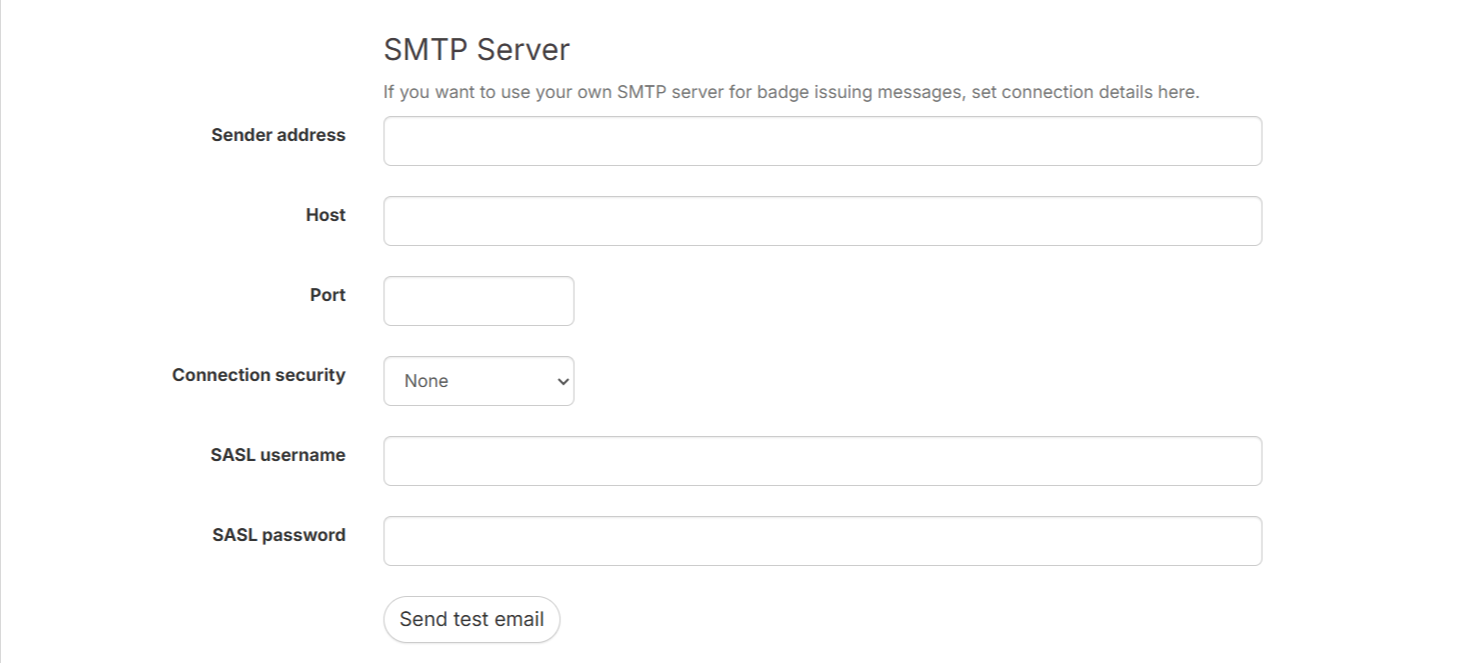
Save your settings and send a test email to confirm the configuration works.
IP address:
If you need our IP address:
Need help?
If you’re unsure about your SMTP settings or encounter delivery issues, contact your email provider or reach out to Open Badge Factory support for assistance.
Was this article helpful?
That’s Great!
Thank you for your feedback
Sorry! We couldn't be helpful
Thank you for your feedback
Feedback sent
We appreciate your effort and will try to fix the article